> ## Documentation Index
> Fetch the complete documentation index at: https://myinternshiporganizer.com/docs/llms.txt
> Use this file to discover all available pages before exploring further.
# Log a recruitment call
> Record calls to host firms so the team can see who's been approached and what they said.
Recruitment calls are how you find host firms for an internship's interns. This
is where placement actually begins — you call companies until one agrees to take
students, and the call is where you record that agreement.
Logging a call does more than keep notes. When you record how many places a firm
agreed to, Minto connects that firm to the internship for you, ready for interns
to be assigned to it.
## Before you begin
* Any role can log calls.
* The firm must already be in your **Firms** list — see
[Add a host firm](/docs/how-to/add-a-host-firm).
* Open the internship you're recruiting for. Every call is recorded against at
least one internship; you can't log one on its own.
## Log a call
In the sidebar, select **Internships**, select the internship, then select
**Calls**.
Select **New Call**.
**Recommended** lists firms that suit this internship and haven't been called
yet. **All firms** searches everything — by name, contact, workplace, field
of expertise or address.
Each firm shows its history and rating, so you can see whether it has hosted
for you before and when it was last contacted.
Choose an **Outcome**, and adjust **Date** and **Time** if you're logging a
call from earlier.
Optional: choose a **Contact Person**, and add a **Note**. The note is what
your colleagues will read before calling this firm again — "wants CVs first"
saves someone a wasted call.
Under **Workplaces**, set how many students each site accepted.
This is the step that matters — a number above zero connects the firm to
the internship, so it becomes available when you assign interns.
On **Intern Approved** it isn't optional: **Save** stays disabled until at
least one workplace has a number, with *"At least one intern must be
assigned to a workplace for this outcome."*
Select **Save**.
## Recording places
Places are entered **per workplace**, and only against the outcome **Intern
Approved** — the only positive outcome. On any other the inputs are disabled,
with *"Accepted students can only be set for positive outcomes."*
A firm with no workplaces recorded has nowhere to enter a number, so a call can
never connect it. If a firm has agreed to take interns, add a workplace first —
see [Manage a host firm](/docs/how-to/manage-a-host-firm).
The constraint on outcomes is deliberate: "They Don't Know Yet" is encouraging,
but nobody has committed, so there's nothing to connect a firm for yet. Log a
second call when they decide.
## Outcomes
The outcome drives the firm's rating, whether it comes back under Recommended,
and whether you can record places.
Logging **Don't Contact Us** records the refusal but doesn't stop the firm being
suggested again. To do that, tick **Don't Contact** on the firm itself.
| Outcome | Use it when | Can record places |
| ------------------------------- | ------------------------------------------------------- | :---------------: |
| **Intern Approved** | They've agreed to take students. | ✓ |
| **They Don't Know Yet** | They need time to decide internally. | — |
| **Call Later** | Right firm, wrong moment — they asked you to try again. | — |
| **E-mail - Didn't Respond Yet** | You've written and are waiting. | — |
| **Unavailable** | Couldn't reach anyone. | — |
| **Intern Rejected** | They looked and said no. | — |
| **Don't Contact Us** | They've asked to be left alone. | — |
## Why a firm is recommended
Recommendations match the internship's **field of expertise** against each firm's,
and drop firms that have already been called for this internship.
A firm with no fields of expertise recorded will never be recommended, however
suitable it is. That's the main reason to fill them in when you add a firm — see
[Add a host firm](/docs/how-to/add-a-host-firm).
A Firm Admin can tune how firms are ranked under **Settings** > **Firm call
policy** — see [How firms get recommended](/docs/reference/firm-recommendations).
## See every call
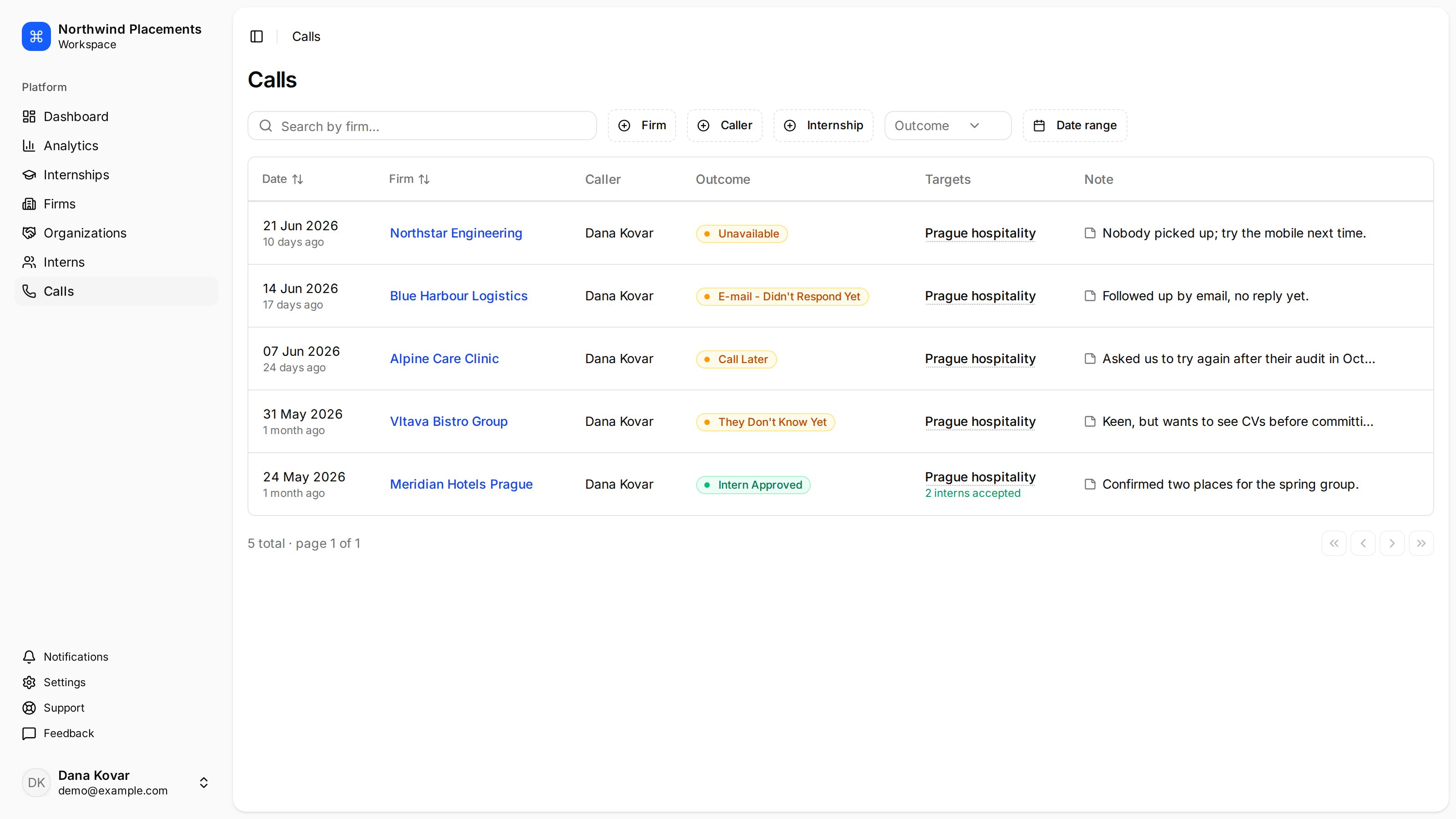
The **Calls** entry in the sidebar shows every call across all internships, with
filters for firm, caller, internship, outcome and date range. It's the quickest
way to answer "has anyone spoken to this company recently?"
 ## Troubleshooting
**"No recommended firms — they're all already called or no FOE matches."**
Either you've worked through the suitable firms, or the firms you have don't
have fields of expertise recorded. Switch to **All firms** to search directly.
**The same firm keeps coming up.**
Nobody logged the call. Recommendations only exclude firms with a call recorded
against this internship — a call made and not logged is invisible.
**"Accepted students can only be set for positive outcomes."**
The number of places is only editable on **Intern Approved**. Change the outcome
if they really did commit.
**A firm agreed but doesn't appear when assigning interns.**
Either the call recorded no places, or the firm has no workplaces so there was
nowhere to enter them. Add a workplace to the firm, then edit the call.
**"At least one target (internship) is required."**
The call isn't attached to an internship. Start from the internship's **Calls**
section rather than the sidebar, so the target is set for you.
## Troubleshooting
**"No recommended firms — they're all already called or no FOE matches."**
Either you've worked through the suitable firms, or the firms you have don't
have fields of expertise recorded. Switch to **All firms** to search directly.
**The same firm keeps coming up.**
Nobody logged the call. Recommendations only exclude firms with a call recorded
against this internship — a call made and not logged is invisible.
**"Accepted students can only be set for positive outcomes."**
The number of places is only editable on **Intern Approved**. Change the outcome
if they really did commit.
**A firm agreed but doesn't appear when assigning interns.**
Either the call recorded no places, or the firm has no workplaces so there was
nowhere to enter them. Add a workplace to the firm, then edit the call.
**"At least one target (internship) is required."**
The call isn't attached to an internship. Start from the internship's **Calls**
section rather than the sidebar, so the target is set for you.