> ## Documentation Index
> Fetch the complete documentation index at: https://myinternshiporganizer.com/docs/llms.txt
> Use this file to discover all available pages before exploring further.
# Set up internship logistics
> Assign companions, buddies and the sending organization that support a group while they're with you.
The Logistics module covers the people around an internship rather than the
placement itself — who travels with the group, who looks after them locally, and
which partner organization sent them.
## Before you begin
* Any role can edit logistics.
* **The internship has to be approved.** Buddies, companions and services can't
be added while it's still Requested — see
[What you can change, and when](/docs/reference/internship-phases). This is the
opposite of most other setup work, which stops being possible once approved.
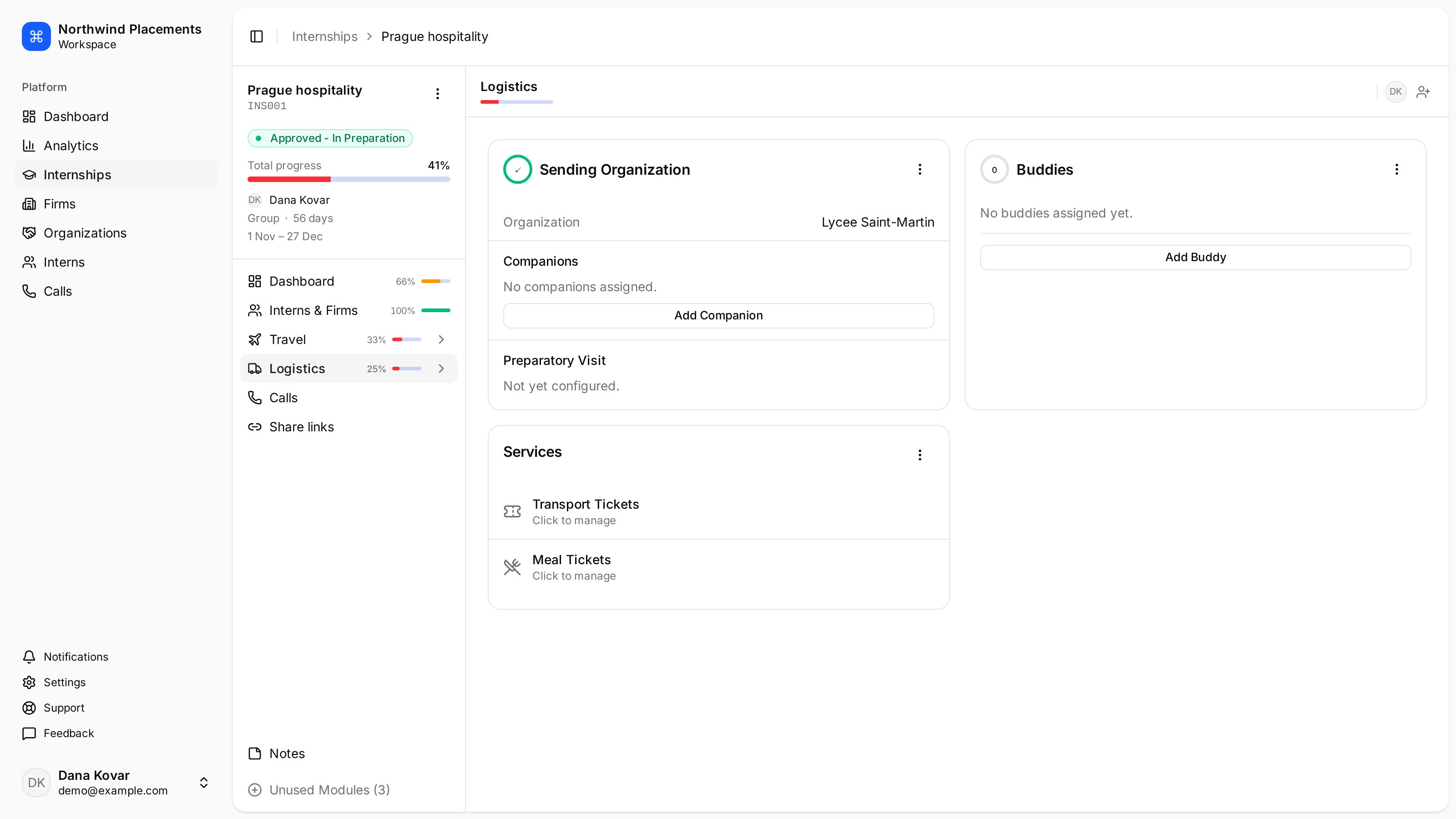
## What's in Logistics
| Item | What it is |
| ------------------------ | ------------------------------------------------------------------------------- |
| **Sending organization** | The school or agency that sent this group. |
| **Companions** | People from the *sending organization* who travel with the group. |
| **Buddies** | People from *your* team who support the group locally. |
| **Services** | Transport tickets and meal tickets for the group. Select either to manage them. |
The companion/buddy distinction is the one people get wrong. A companion belongs
to the partner organization; a buddy is one of your own colleagues.
 ## Assign a buddy
Buddies are your colleagues, so they come from your employees list.
In the sidebar, select **Internships**, select the internship, then select
**Logistics**.
Under **Buddies**, select **Add Buddy**, choose the colleague, then select
**Add**.
Anyone in your organization can be a buddy, whatever their role.
## Assign a companion
Companions belong to the sending organization, so they have to exist there
first.
Select **Logistics** on the internship.
Under **Companions**, select **Add Companion**, then select the person.
There's no confirm step — selecting them adds them straight away.
Select **Create new companion**, enter at least a last name, then select
**Create & Add**.
## Change the sending organization
Under **Sending Organization**, select the organization row to change which
partner this internship belongs to. This also changes which companions are
available, since they come from that organization.
Companions sit inside the Sending Organization card rather than beside it, which
is why they move when you change it.
## Troubleshooting
**"No employees found."**
The sending organization has nobody recorded yet. Create the companion here, or
ask the partner to add their staff on their side if they use Minto.
**"No sending organization connected. Connect a sending organization first to
manage companions."**
Companions come from the sending organization, so set one first.
**A colleague isn't in the Add Buddy list.**
They've been deactivated, or they haven't accepted their invitation yet — people
only become employees once they sign in. See
[Invite your team](/docs/how-to/invite-your-team).
**"Failed to add buddy" or "Failed to update companion".**
The internship is still Requested. Nothing is greyed out to warn you — the
dialog opens normally and the save is refused. Approve the internship first.
## Assign a buddy
Buddies are your colleagues, so they come from your employees list.
In the sidebar, select **Internships**, select the internship, then select
**Logistics**.
Under **Buddies**, select **Add Buddy**, choose the colleague, then select
**Add**.
Anyone in your organization can be a buddy, whatever their role.
## Assign a companion
Companions belong to the sending organization, so they have to exist there
first.
Select **Logistics** on the internship.
Under **Companions**, select **Add Companion**, then select the person.
There's no confirm step — selecting them adds them straight away.
Select **Create new companion**, enter at least a last name, then select
**Create & Add**.
## Change the sending organization
Under **Sending Organization**, select the organization row to change which
partner this internship belongs to. This also changes which companions are
available, since they come from that organization.
Companions sit inside the Sending Organization card rather than beside it, which
is why they move when you change it.
## Troubleshooting
**"No employees found."**
The sending organization has nobody recorded yet. Create the companion here, or
ask the partner to add their staff on their side if they use Minto.
**"No sending organization connected. Connect a sending organization first to
manage companions."**
Companions come from the sending organization, so set one first.
**A colleague isn't in the Add Buddy list.**
They've been deactivated, or they haven't accepted their invitation yet — people
only become employees once they sign in. See
[Invite your team](/docs/how-to/invite-your-team).
**"Failed to add buddy" or "Failed to update companion".**
The internship is still Requested. Nothing is greyed out to warn you — the
dialog opens normally and the save is refused. Approve the internship first.