> ## Documentation Index
> Fetch the complete documentation index at: https://myinternshiporganizer.com/docs/llms.txt
> Use this file to discover all available pages before exploring further.
# Share interns with a host firm
> Send a firm a private link so they can review candidates and request the ones they want.
A share link gives a host firm a private URL where they can look through your
unplaced interns and ask for the ones that suit them. It saves emailing CVs back
and forth, and every request lands in Minto rather than in someone's inbox.
Each recipient at the firm gets their own URL, so you can see who looked at what.
## Before you begin
* Your plan must include **intern share links**. If the option isn't there, it's
a plan limit, not your role — any Firm Admin can check under **Settings** >
**Billing**.
* The host firm must already exist and have at least one active employee to
send the link to.
* The internship needs interns who aren't placed yet. A link with nothing to show
is no use to the firm.
## Create the share link
In the sidebar, select **Internships**, select the internship, then select
**Share links**.
Select **New share link**.
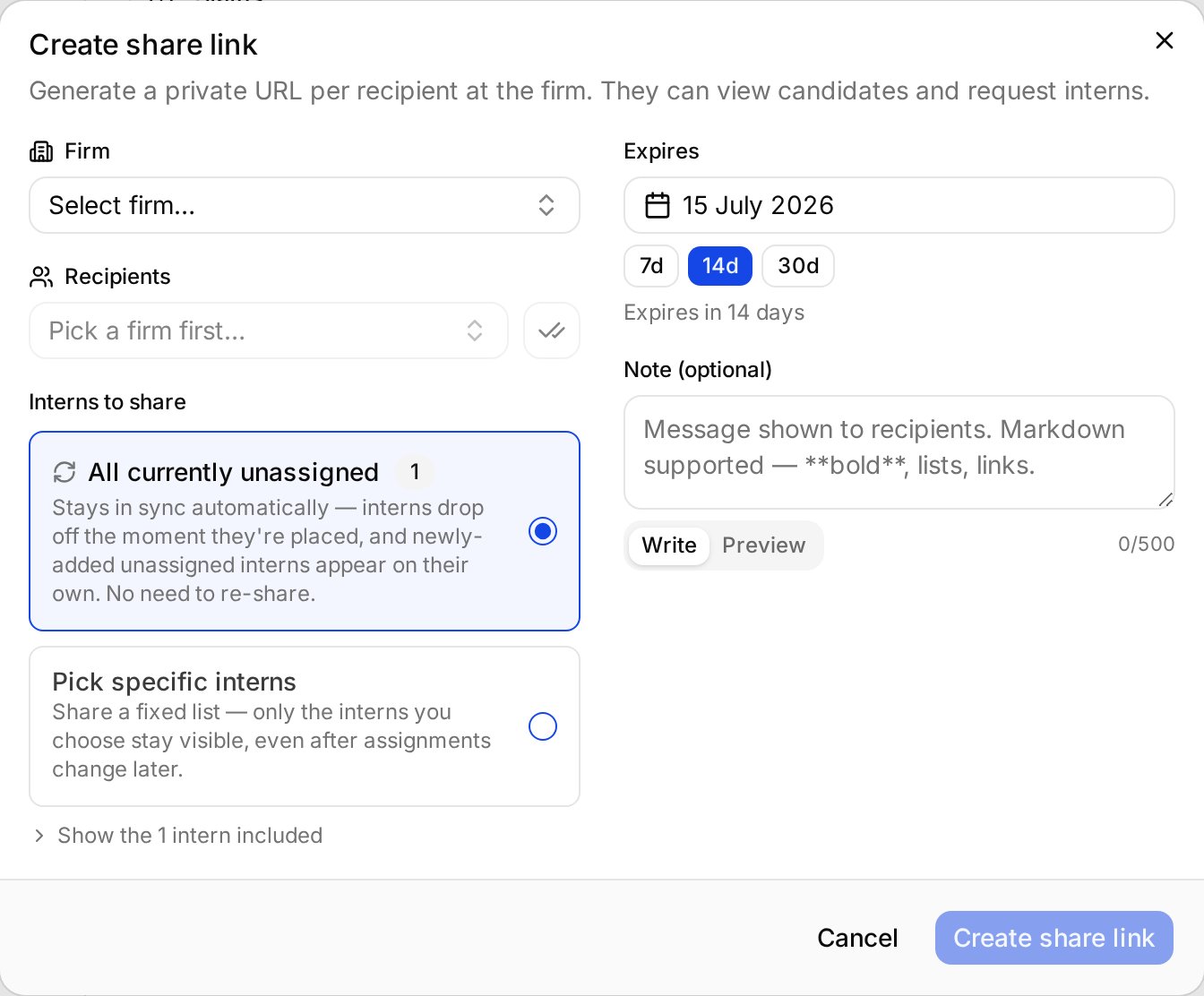
Choose the firm under **Firm**, then choose one or more people under
**Recipients**. Recipients only become selectable once you've picked a firm.
Everyone chosen gets their own private URL.
Choose one:
* **All currently unassigned** keeps itself up to date. Interns drop off the
moment they're placed, and newly added unplaced interns appear on their
own. You don't have to re-share.
* **Pick specific interns** fixes the shortlist. Nobody new is ever added
to it.
Either way, an intern disappears from the link once they're placed —
"pick specific" freezes *which* interns can appear, not whether a placed one
stays visible. Prefer the first unless you have a reason to show a shortlist.
Choose one of the presets or pick a date. If the internship has a start
date you'll also see **Until start**, and any preset landing on or after
that start is hidden — so close to departure the only choices may be **7d**
and **Until start**.
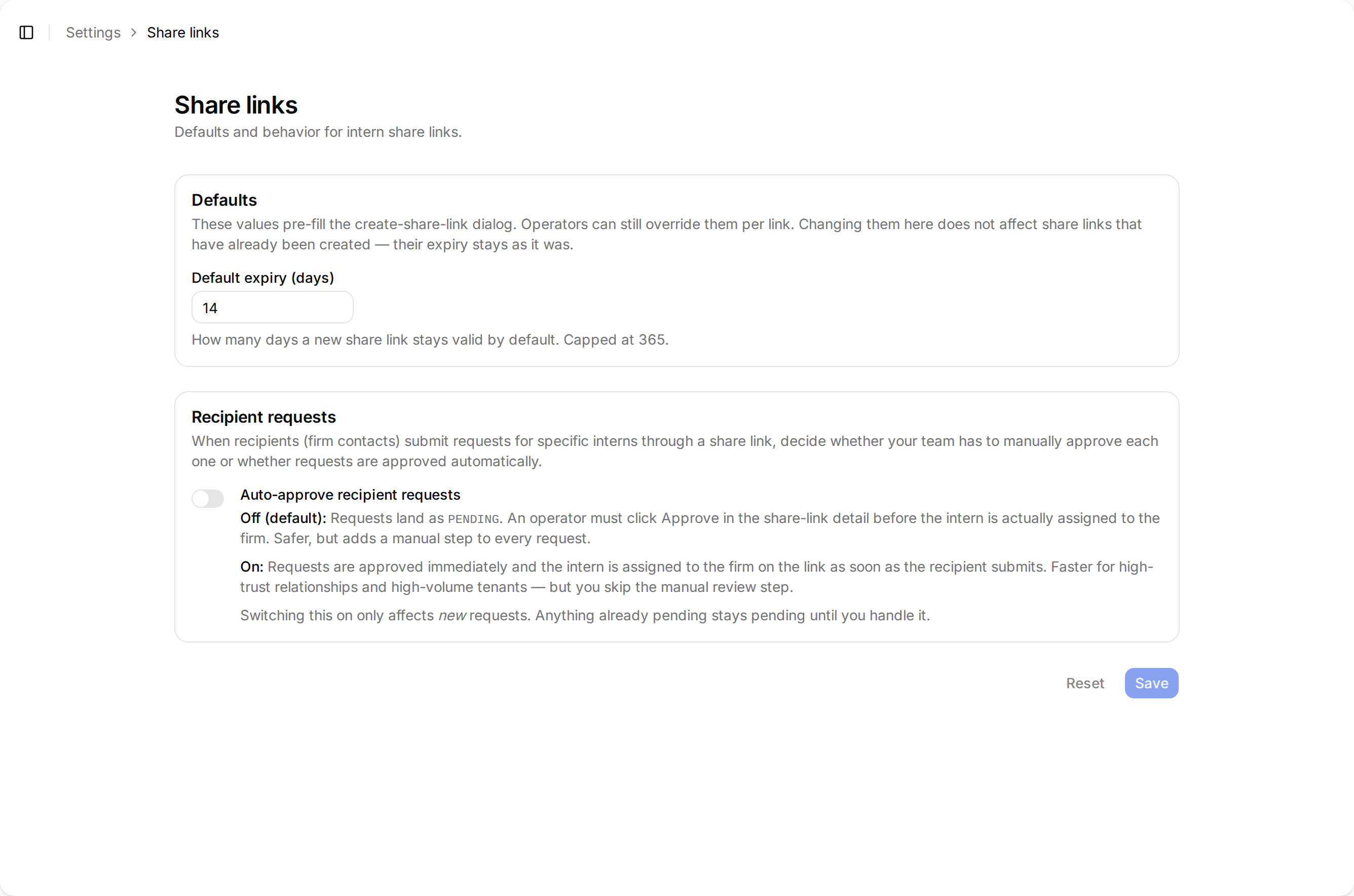
The default comes from your organization's share link settings.
Under **Note**, write a message for the recipients. Markdown works, and
**Preview** shows how it'll look.
Select **Create share link**.
 ## Result
Each recipient gets their own URL, shown in the dialog for you to copy and send
— Minto doesn't email it for you.
From that link they can see the interns you shared and request the ones they
want. [Review candidates you've been sent](/docs/for-firms/review-shared-candidates)
describes the page from their side, and is worth sending along with the link.
## What happens when a firm requests an intern
By default a request arrives as **pending** and nothing changes until someone on
your team acts on it. Open the share link and select **Approve** to assign the
intern to that firm, or decline it.
You can change this under **Settings** > **Share links**:
| Auto-approve | What happens |
| ----------------- | ---------------------------------------------------------------------------------------------------------------------------- |
| **Off** (default) | Requests stay pending until a colleague approves them. Safer — you keep the final say on every placement. |
| **On** | The intern is assigned to the firm as soon as the recipient submits. Faster for firms you trust, but there's no review step. |
Auto-approve is a single organization-wide setting read at the moment a
recipient submits — not something fixed per link. Switching it on makes every
existing link auto-approve from then on, including ones sent months ago.
Requests already pending stay pending until you handle them.
## Result
Each recipient gets their own URL, shown in the dialog for you to copy and send
— Minto doesn't email it for you.
From that link they can see the interns you shared and request the ones they
want. [Review candidates you've been sent](/docs/for-firms/review-shared-candidates)
describes the page from their side, and is worth sending along with the link.
## What happens when a firm requests an intern
By default a request arrives as **pending** and nothing changes until someone on
your team acts on it. Open the share link and select **Approve** to assign the
intern to that firm, or decline it.
You can change this under **Settings** > **Share links**:
| Auto-approve | What happens |
| ----------------- | ---------------------------------------------------------------------------------------------------------------------------- |
| **Off** (default) | Requests stay pending until a colleague approves them. Safer — you keep the final say on every placement. |
| **On** | The intern is assigned to the firm as soon as the recipient submits. Faster for firms you trust, but there's no review step. |
Auto-approve is a single organization-wide setting read at the moment a
recipient submits — not something fixed per link. Switching it on makes every
existing link auto-approve from then on, including ones sent months ago.
Requests already pending stay pending until you handle them.
 ## Troubleshooting
**"No interns are unassigned right now, so this link would show nothing."**
Every intern on this internship is already placed. Add more interns, or use
**Pick specific interns** if you want to show someone who's already assigned.
**"No active employees on this firm."**
Nobody at the firm is recorded, or everyone recorded has been deactivated. Add
someone to the firm first.
**A recipient says their link has stopped working.**
It's expired or been revoked. Expiry is fixed when the link is created —
changing your default expiry later doesn't extend links already sent. Create a
new one.
**You want to stop sharing early.**
Revoke the link. Recipients lose access immediately. Pending requests stay on
file but can no longer be approved — only rejected — so handle anything
outstanding before revoking.
## Troubleshooting
**"No interns are unassigned right now, so this link would show nothing."**
Every intern on this internship is already placed. Add more interns, or use
**Pick specific interns** if you want to show someone who's already assigned.
**"No active employees on this firm."**
Nobody at the firm is recorded, or everyone recorded has been deactivated. Add
someone to the firm first.
**A recipient says their link has stopped working.**
It's expired or been revoked. Expiry is fixed when the link is created —
changing your default expiry later doesn't extend links already sent. Create a
new one.
**You want to stop sharing early.**
Revoke the link. Recipients lose access immediately. Pending requests stay on
file but can no longer be approved — only rejected — so handle anything
outstanding before revoking.