The four records
Intern
A student going abroad on a work placement. Interns come from a sending
organization.
Host firm
A company that takes interns. You add these yourself and reuse them across
many internships.
Sending organization
The school or agency abroad that sends you students. Linked to you by a
connection code.
Internship
One group of interns, travelling for one period, placed at host firms. This
is the unit of work you plan and track.
How they connect
An internship is where the other three meet. It usually has a sending organization, a group of interns, and a host firm for each of them. Two consequences worth knowing early:- Interns aren’t created on their own. You add them inside an internship, not from the Interns page. The Interns page is for finding and reviewing interns you already have.
- Host firms are reusable. Add a firm once and it stays in your list for every future internship. The same is true of sending organizations.
How a placement actually happens
The order surprises people who expect to pick a firm from a list. You don’t choose where an intern goes — you ask companies until one says yes. The step people miss is the third one. Recording how many places a firm agreed to is what connects it to the internship — it isn’t just note-keeping. Skip it and the firm never becomes available to assign interns to, however positive the call was. Connecting a firm by hand is possible, and it’s the right thing for an arrangement made outside Minto. But for active recruitment, the call is the route.Placement is the core job
Adding an intern to an internship puts them on the roster. It doesn’t place them anywhere yet — they still need a host firm that has agreed to take them. The internships list makes this distinction visible. Both columns count against the planned number of interns, not the roster:- Approved — places host firms have agreed to take, from your recruitment calls.
- Assigned — interns actually given a firm.
1/3 under Assigned means one of three planned places filled. Approved
running ahead of Assigned is the normal state: firms have said yes, and you
haven’t allocated the students yet.
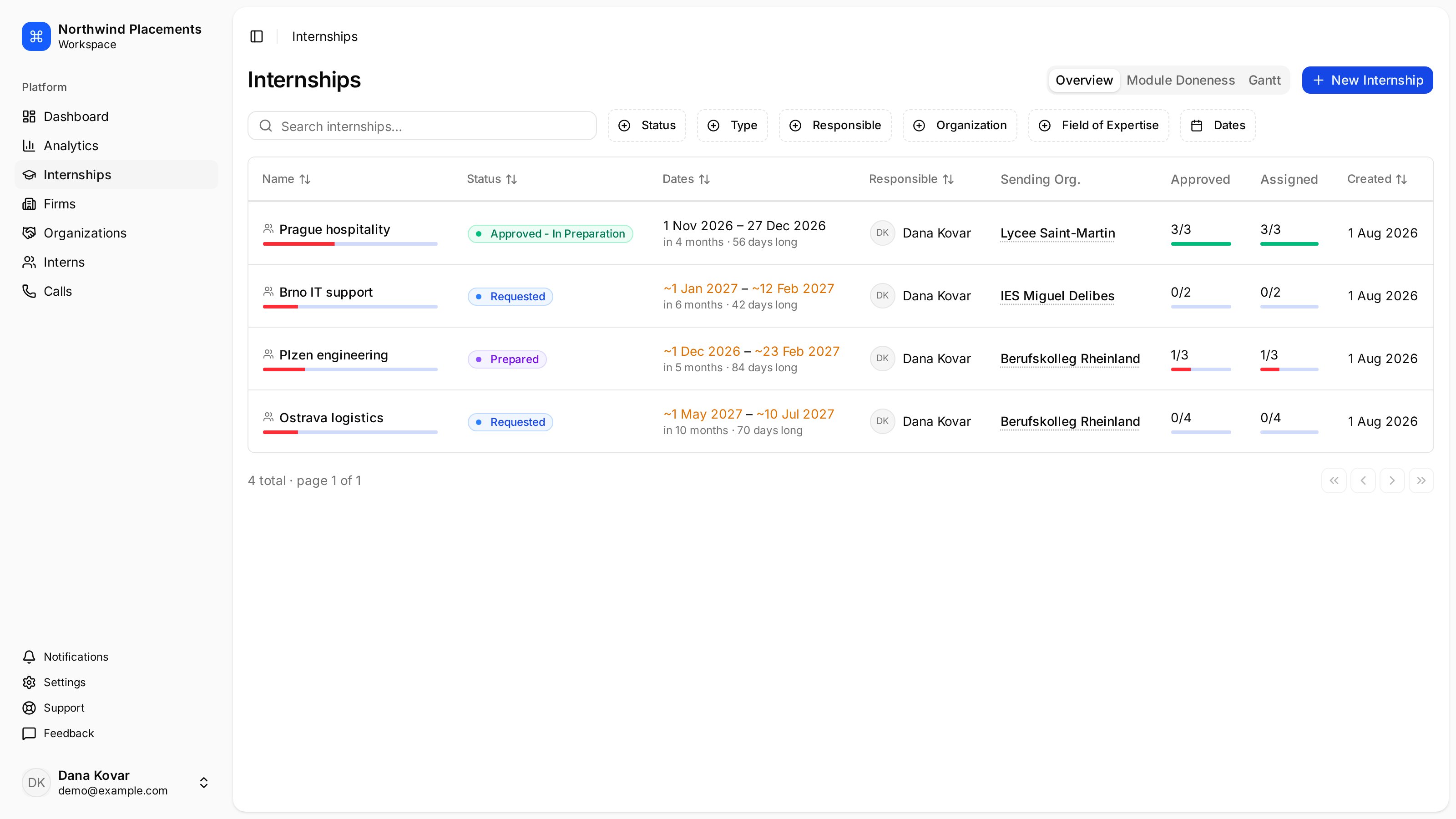
The internships list. Assigned shows placement progress — 3/3 is fully placed, 0/4 has nobody placed yet.
Fields of expertise
Internships and host firms both carry fields of expertise — Hospitality & Tourism, IT & Software, Engineering, and so on. Matching is internship against firm, not intern against firm: when you’re looking for somewhere to place a group, Minto recommends firms whose fields overlap the internship’s. You choose the internship’s when you create it.Where to go next
Add a host firm
Build up the list of companies that can take your interns.
Create an internship
Set up a travel period and start adding interns.